
Installation Tools & Supplies

- $81.84SKU: 222GY0500
West Penn 222GY0500 20/2 Unshielded CMR Cable 500 ft Gray
- 20/2 Unshielded CMR Cable, 500', Gray
$81.84Low Price Guarantee - $71.56SKU: MX-FLEX-OPT-CBL-3
Mobotix MX-FLEX-OPT-CBL-3 Sensor Cable for 6MP S15 Cameras and Thermal Sensors, 9.8'
- Connects Sensor to Camera Module
$71.56Low Price Guarantee - $69.95SKU: 750060
MDY Group 750060 RG59 + Power Siamese Cable CCTV Wire RG59/U, Pull-Out Box 95%, White, 500 Feet
- Siamese cable is often used in Closed-Circuit Television (CCTV) setups and surveillance cameras
- Cable provides all requirements for the cameras without the need of finding a power source next to the install location
$69.95Low Price Guarantee - $68.04SKU: LS-54-105
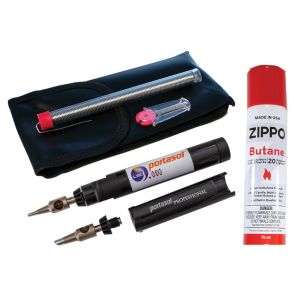
LSDI LS-54-105 P-1 Portasol Soldering Kit
- Assorted spare tips
- Flint ignition
- 60 minute run time
- Anti Static ESD Safe
- Ready to melt solder less than 30 seconds from ignition
$68.04Low Price Guarantee - $62.11$62.11Low Price Guarantee
- $56.95$56.95Low Price Guarantee
- $56.00SKU: ER-HCM1
VMP ER-HCM1 Horizontal Cable Manager- 1U
- Fits EIA Standard 19″ Racks and Cabinets
- Contoured ″Finger Duct″ spaced 1.4″
- Allows for easy cable routing, adds, changes and moves
- Generous Pass Through Ports allow front to back cabling
- Convenient Snap-on Cover opens up or down
$56.00Low Price Guarantee - $53.52SKU: 12516C
Platinum Tools 12516C Tele-TitanXg 2.0 Crimp Tool Clamshell
- One tool does the job of two tools
- Improve efficiencies by not having to change out tools in the middle of your termination
- Straight action crimp achieved with minimal hand force
- Compact and rugged design
- Terminates to industry specified crimp heights
- Gun-style lock for secure closure
$53.52Low Price Guarantee - $52.47SKU: WDRV-4240
Weldex WDRV-4240 40' Cable with 4-pin Locking Connectors
- 40' D.I.N. extension cable for rear fixed camera
- 4 pin male to female
$52.47Low Price Guarantee




Installation Tools & Supplies Frequently Asked Questions
What tools do I need to install a surveillance camera?
To install a surveillance camera, you'll typically need a drill, screwdriver, and various installation tools like cable strippers and crimpers. Additionally, having a level and measuring tape can help ensure proper placement. Depending on the type of camera, you may also need specific cables, connectors, and mounting hardware, which are often included in the camera kit.
How do I choose the right cable for my surveillance system?
The right cable for a surveillance system depends on the camera type and distance from the recording device. Common options include coaxial cables for analog cameras and Ethernet cables for IP cameras. Ensure the cable is compatible with your system's specifications, such as gauge and shielding type, to maintain video quality and prevent interference.
What is the purpose of a keystone jack in surveillance installation?
A keystone jack is used to connect cables in a structured wiring system, providing a secure and organized way to connect surveillance cameras to networking equipment. It allows for easy insertion and removal of cables, facilitating maintenance and upgrades. Using keystone jacks can help manage cable clutter and improve the overall aesthetics of your installation.
Do I need special tools for terminating alarm wire?
Yes, terminating alarm wire requires specific tools, such as a wire stripper, crimper, and possibly a punch-down tool for connecting wires to terminals. These tools ensure proper connections and minimize signal loss, which is crucial for the reliability of your alarm system. Using the right tools can also prevent damage to the wires during the termination process.
What should I consider when selecting installation supplies for my surveillance system?
When selecting installation supplies, consider the type of surveillance system, the environment (indoor or outdoor), and the distance between components. Look for high-quality cables, connectors, and tools that match the specifications of your cameras and recording devices. Additionally, ensure that the supplies are compatible with the installation location to avoid issues like signal loss or physical damage.
Filter
Shopping Options
