
IP-COM Speco IRIS Eclipse Tools Interlogix Linear Comnet Veracity Power
Filter

- $28.00SKU: PS12-1-25
Linear PS12-1-25 Power Supply, Wall Mount, 100-240 V, 0.50A 12VDC, 1.25A Level VI
- Power Supply
- Wall Mount
- 100-240 V, 0.50A
- 12VDC, 1.25A Level VI
$28.00Low Price Guarantee - $178.08SKU: VOR-OS-90-US
Veracity VOR-OS-90-US OUTSOURCE 90, Hi-PoE Midspan Injector and US Power Cable, 90W
- Delivers maximum remote power to IP cameras & POE devices
- 802.3bt compliant and GigE compatible
- 90W Power output
- Safety assured as POE is only enabled to compliant devices
$178.08Low Price Guarantee - $195.99SKU: BC-MX5102
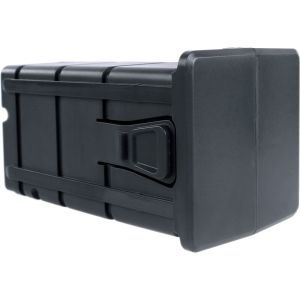
Linear BC-MX5102 Replacement Battery Pack (1) MX5102
- Battery Backup
- 600VA UPS, 2 Outlets
- Clean Power Level 3
$195.99Low Price Guarantee - $122.00SKU: PS-MORD1260
Comnet PS-MORD1260 Industrial DIN Rail Mountable Power Supplie
- Universal AC input: 85 to 264 VAC, 47-63Hz
- Small package size for limited space installations
- Mounts on standard 35 mm (DIN 3 or TS-35) DIN rail ″ "TS-35 x 7.5 or TS-35 x 15
- Wide operating temperature range: - 40° C to +70° C
- Natural convection cooling ″ "no troublesome fans
$122.00Low Price Guarantee - $29.23SKU: VPSU-12V-U
Veracity VPSU-12V-U 12V DC Power Supply
- Power Supply for HighWire
- Automatic Voltage Adjustment
$29.23Low Price Guarantee - $145.20SKU: P9W10DUL
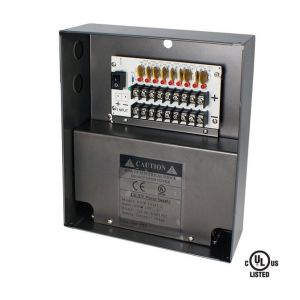
Speco P9W10DUL 9 Channel 12VDC Power Supply with 10A Output
- UL listed
- 12VDC fused output for 9 cameras
- More than 1A per channel output
- Individual PTC auto reset fuse for each output
- Individual LED status indicator for each output
$145.20Low Price Guarantee - $85.03SKU: VAD-PS-BM
Veracity VAD-PS-BM Battery Pack for Pointsource Wireless
- For POINTSOURCE Wireless
- Rechargeable Lead-Acid Battery
- 12V @ 3.4Ah
$85.03Low Price Guarantee - $55.86SKU: RP1012
Linear RP1012 Power Supply, 16V, for MM272
- Output Voltage: 16V
- Compatible with MM272 opener models
- Standard AC wall plug design
- Maintains charge on internal battery
$55.86Low Price Guarantee - $50.30SKU: MIW-SURGE-1G
Linear MIW-SURGE-1G 15A In-Wall Duplex, 2 Outlets with Surge Protection
- Decora Faceplate Interface
- Piece surrounds the receptacles and fits within a standard cover plates Decora cutout.
- Uses standard wiring device screw-hole.
- Bi-color Indicator LED.
- Green = Power OnRed = Line Fault
$50.30Low Price Guarantee



Power Supply Frequently Asked Questions
What is a power supply for surveillance cameras?
A power supply for surveillance cameras is a device that provides the necessary electrical power to operate the cameras. It converts the electrical voltage from a wall outlet to the specific voltage required by the cameras, ensuring they function correctly and consistently.
How do I choose the right power supply for my surveillance system?
To choose the right power supply, consider the voltage and current requirements of your surveillance cameras. Check the specifications to ensure compatibility. Additionally, factor in the number of cameras you will be connecting to the power supply to ensure it can handle the total load.
What is the difference between a standard power supply and a UPS for surveillance systems?
A standard power supply provides continuous power to surveillance cameras, while an uninterruptible power supply (UPS) offers backup power during outages. A UPS ensures that cameras remain operational during power failures, providing added security and preventing data loss.
Can I use a power supply with multiple cameras?
Yes, you can use a power supply with multiple cameras, provided it has enough power output to support the total current draw of all connected cameras. It is essential to check the power supply's specifications and the cameras' requirements to ensure proper functionality.
What should I do if my surveillance camera is not getting power?
If your surveillance camera is not getting power, first check the power supply connections to ensure they are secure. Verify that the power supply is functioning correctly and providing the required voltage. If issues persist, consider inspecting the camera for faults or refer to the manufacturer’s warranty page for further assistance.
Filter
Now Shopping by
Shopping Options 