
Appro ELK Installation Tools & Supplies
Filter

- $20.45SKU: WA005
ELK WA005 Cell Ant Extender Cable, 22.96 Feet
- Cell Ant Extender Cable, RG58U x 7m
- SMA Male to SMA Female
$20.45Low Price Guarantee - $176.58SKU: BLT
ELK BLT Battery Life Tester, 12 Volt
- Does not discharge or damage the battery
- Tests 12 Volt Rechargeable Batteries
- Display Shows Battery Voltage and Mhos
- Warns if battery voltage is too low
- Replaceable test leads
$176.58Low Price Guarantee - $226.84SKU: APT035
Appro APT035 3.5" LCD Video Service Monitor, 960 x 240, PTZ Control Test Function
- 3.5" LCD Video Service Monitor, 960 x 240
- PTZ Control Test Function
- Video Patten Generating Function
- RS485 Data Test Function
- New Design w/ Number Buttons
$226.84Low Price Guarantee - $222.60SKU: CH-TFT5-6DTK
APPRO CH-TFT5-6DTK 5.6-inch TFT LCD Video Service Mon
- 5.6" TFT LCD video service monitor with sun shield, and audio
- Includes Rechargeable Charger
- 960 x 234 Resolution
- DC 12V ~ 24V / 8W
$222.60Low Price Guarantee - $194.60SKU: CH-TFT4-2HTN
Appro CH-TFT4-2HTN 4 TFT LCD Video Service Monitor
- 4" TFT LCD video service monitor with sun shield, and audio
- Includes Rechargeable Battery & Charger
- 480 x 234 Resolution
- 12VDC / 750mA
$194.60Low Price Guarantee - $180.60SKU: APT030
Appro APT030 3.0" LCD Video Service Monitor, 960 x 240, PTZ Control Test Function
- 3.0" LCD Video Service Monitor, 960 x 240
- PTZ Control Test Function
- Video Patten Generating Function
- RS485 Data Test Function
- UTP Cat5/6 Cable Test Function
$180.60Low Price Guarantee - $75.50SKU: 110
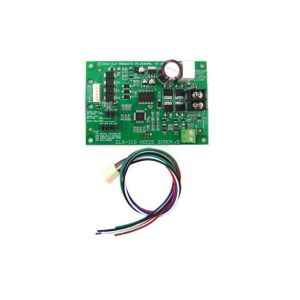
ELK 110 Voice/Siren Driver with Temporal Coded Bell
- MilliMiser™Lowers Current Draw
- ComboTrigger™For Single Outputs
- VolumeStep™Slowly Increases Siren Volume
- Temporal 3 Coded Fire Signal
- Temporal 4 Coded CO Signal
$75.50Low Price Guarantee - $45.53SKU: USB232
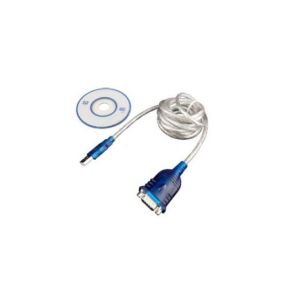
ELK USB232 Serial Cable to Convert USB to RS-232
- Male USB to Male DB9
- Speed: USB 2.0
- Cable Length: 6'
- Includes CD with Device Drivers
$45.53Low Price Guarantee - $21.50SKU: 999A
ELK 999A Double Sided Mounting Tape
- Flexible, Conforms To Irregular Surfaces
- Hundreds Of Uses And Applications
- Ideal For Mounting Circuit Boards
- Assortment of Thicknesses
- Handy Reusable Poly Storage Box
$21.50Low Price Guarantee



Installation Tools & Supplies Frequently Asked Questions
What tools do I need to install a surveillance camera?
To install a surveillance camera, you'll typically need a drill, screwdriver, and various installation tools like cable strippers and crimpers. Additionally, having a level and measuring tape can help ensure proper placement. Depending on the type of camera, you may also need specific cables, connectors, and mounting hardware, which are often included in the camera kit.
How do I choose the right cable for my surveillance system?
The right cable for a surveillance system depends on the camera type and distance from the recording device. Common options include coaxial cables for analog cameras and Ethernet cables for IP cameras. Ensure the cable is compatible with your system's specifications, such as gauge and shielding type, to maintain video quality and prevent interference.
What is the purpose of a keystone jack in surveillance installation?
A keystone jack is used to connect cables in a structured wiring system, providing a secure and organized way to connect surveillance cameras to networking equipment. It allows for easy insertion and removal of cables, facilitating maintenance and upgrades. Using keystone jacks can help manage cable clutter and improve the overall aesthetics of your installation.
Do I need special tools for terminating alarm wire?
Yes, terminating alarm wire requires specific tools, such as a wire stripper, crimper, and possibly a punch-down tool for connecting wires to terminals. These tools ensure proper connections and minimize signal loss, which is crucial for the reliability of your alarm system. Using the right tools can also prevent damage to the wires during the termination process.
What should I consider when selecting installation supplies for my surveillance system?
When selecting installation supplies, consider the type of surveillance system, the environment (indoor or outdoor), and the distance between components. Look for high-quality cables, connectors, and tools that match the specifications of your cameras and recording devices. Additionally, ensure that the supplies are compatible with the installation location to avoid issues like signal loss or physical damage.
